 Nudes Remover
 en
en Русский
Custom bot
Have warnings and deletion notices posted under your own bot's name.
Requires a Premium subscription for the group.
By default, every warning Nudes Remover posts comes from @NudesRemoverBot. Connect your own bot token and it posts from your bot instead — useful for communities that want a consistent, branded bot identity rather than a visibly third-party one.
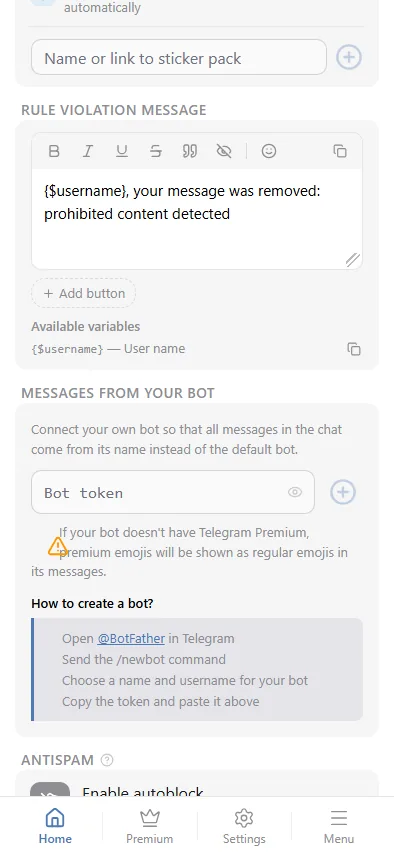
How to create a bot
- Open @BotFather in Telegram.
- Send the
/newbotcommand. - Choose a name and username for your bot.
- Copy the token BotFather gives you and paste it into the Bot token field in the mini app.
What changes, and what doesn't
- Warning messages and deletion notices are posted by your bot.
- The actual content moderation, threshold and categories are unaffected — your bot is a delivery identity, not a separate moderation engine.
- If your bot doesn't have Telegram Premium, premium emoji in the message fall back to regular emoji.
- If the token becomes invalid (revoked in BotFather, or the bot deleted), the custom-bot setting is cleared automatically, delivery falls back to the default bot, and the group owner gets a one-time notice about it.
Clearing the token field and saving removes the custom bot and reverts to the default @NudesRemoverBot.